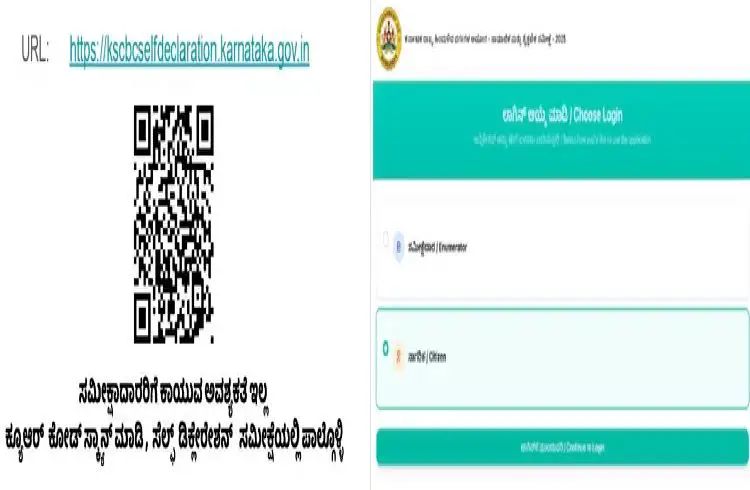
A social, educational and economic survey is underway across the state. Census officers are conducting a caste census survey by going door to door. As a public, you do not need to wait for the census officers to arrive. You can fill out the application online and enter your information.
Yes, you don’t have to wait for the enumerator. You can fill and submit the application yourself through a simple online procedure. All you have to do is follow these steps and enter all the information for the caste census survey online.
Participate in the caste census survey online, enter your information like this
First of all, you need to visit the website https://kscbcelfdeclaration.karnataka.gov.in.
You can also scan the QR code on the sticker that the electricity bill collector has pasted on your door and participate in the self-declaration survey.
The user needs to click on the Citizen option to proceed with the self-declaration.
The user needs to enter the mobile number and get an OTP.
The user needs to enter the OTP to login.
Click on Start a new survey to start.
The user needs to enter their UHID and click on Verify UHID.
If the user does not have a UHID, click on I don’t have a UHID and enter the ESCOM account ID.
Click and upload the photo of the survey participant.
The user has to select Ration Card or Aadhaar Card.
If it is a Ration Card, the user has to enter their Ration Card Number and click on Submit RC Info. Then click on Submit to continue.
If it is Aadhaar, the user has to enter the name of the head of the household as it appears on the Aadhaar card. Click on Confirm Aadhaar OTP.
The user can choose OTP or Face Capture. If it is OTP, enter the OTP sent to the mobile number.
If it is Face Capture, the user has to scan the QR code with the CeG Face KYC mobile application.
The user has to enter the mobile number of the phone on which the application is located. Click on Scan QR. After scanning, the user has to complete the face capture in the application.
After e-KYC, the user has to click on Get Data and continue. After the e-KYC of the head of the household, the user has to add family members.
To add a member, click on Add Member and complete the member information.
If the member information is obtained from the ration card and no member is alive, the member should be marked as deceased. Click on deceased and confirm.
After adding all the family members, select the head of the household, enter the mobile number and OTP and start the survey.
The user should complete the individual survey for all the members and then the family survey.
After completing the questionnaire, click on submit.
The user can see the preview of the survey before submitting it.
The user should click on and upload the photo of the self-declaration document.
After submission, the user will get an application number.